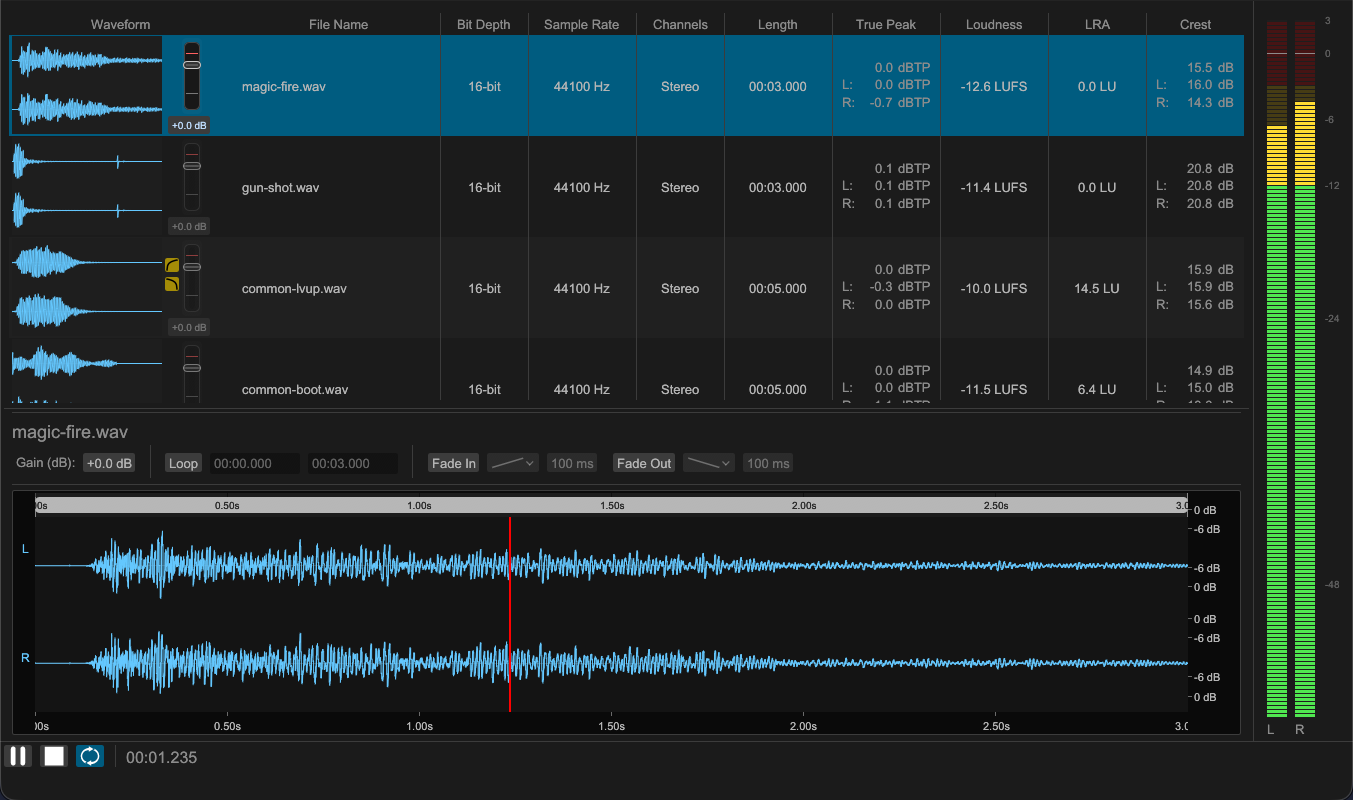
Format and loudness at a glance
Waveform, loudness, true peak, LRA, crest factor, sample rate, bit depth, channel count, and length are listed as columns. Loop, fade, and trim state appear as icons, so files still missing those settings are easy to spot.
Apply to selection or to everything
Loudness, target peak, and fade settings can be applied to the selected files or to every file loaded. Values you use often can be saved as named presets and recalled in one step.
Loudness (LUFS) and true peak adjustment
Set a target integrated loudness and a true peak ceiling, and bring the files in line with it. Enable the true peak limiter to reach the target while keeping peaks under the ceiling.
Fade in and fade out
Choose a curve and a length to remove clicks at the start and end of playback.
Trimming
Select a range on the waveform and keep only that part, cutting away everything before and after it. Trimming is non-destructive, never touches the source file, and can be cleared at any time.
Loop point editing
Set loop start and end positions, snap them to nearby zero crossings, and export with loop metadata so BGM and ambience repeat seamlessly.
Export with a fixed sample rate and bit depth
Choose WAV, FLAC, AIFF, Ogg Vorbis, MP3, or AAC, and set sample rate and bit depth on export, bringing mismatched source material in line with a delivery spec.
CLI and job file automation
The steps confirmed in the GUI run identically from the CLI. Processing can be written to a TOML job file and dropped into a batch or build step.